For Joel Kallman Day 2026 I have two APEX apps to share and some details about new APIs.
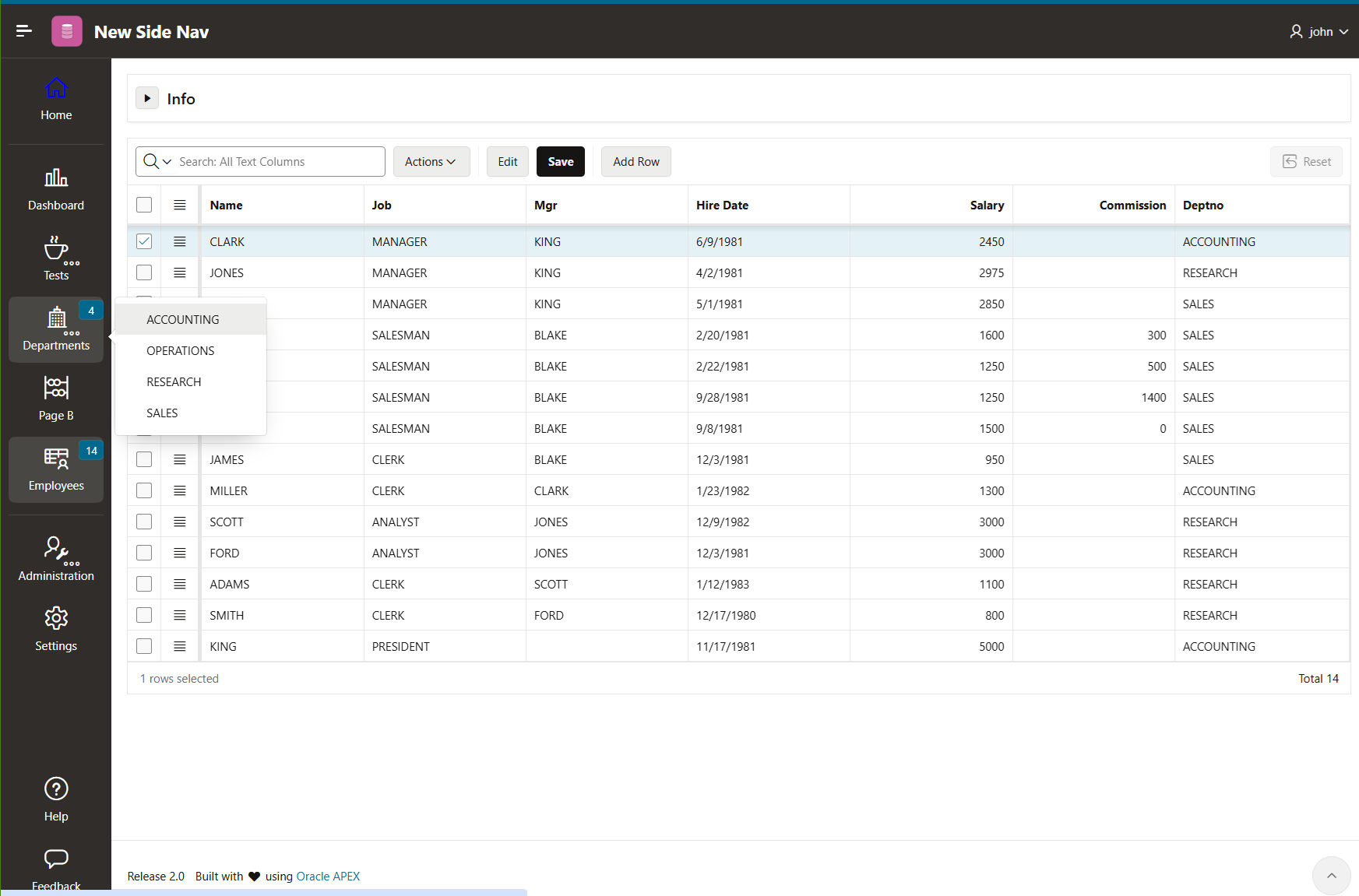
The first is an APEX 26.1 app that shows how to have a side navigation icon bar with popup and hover menus in your app.
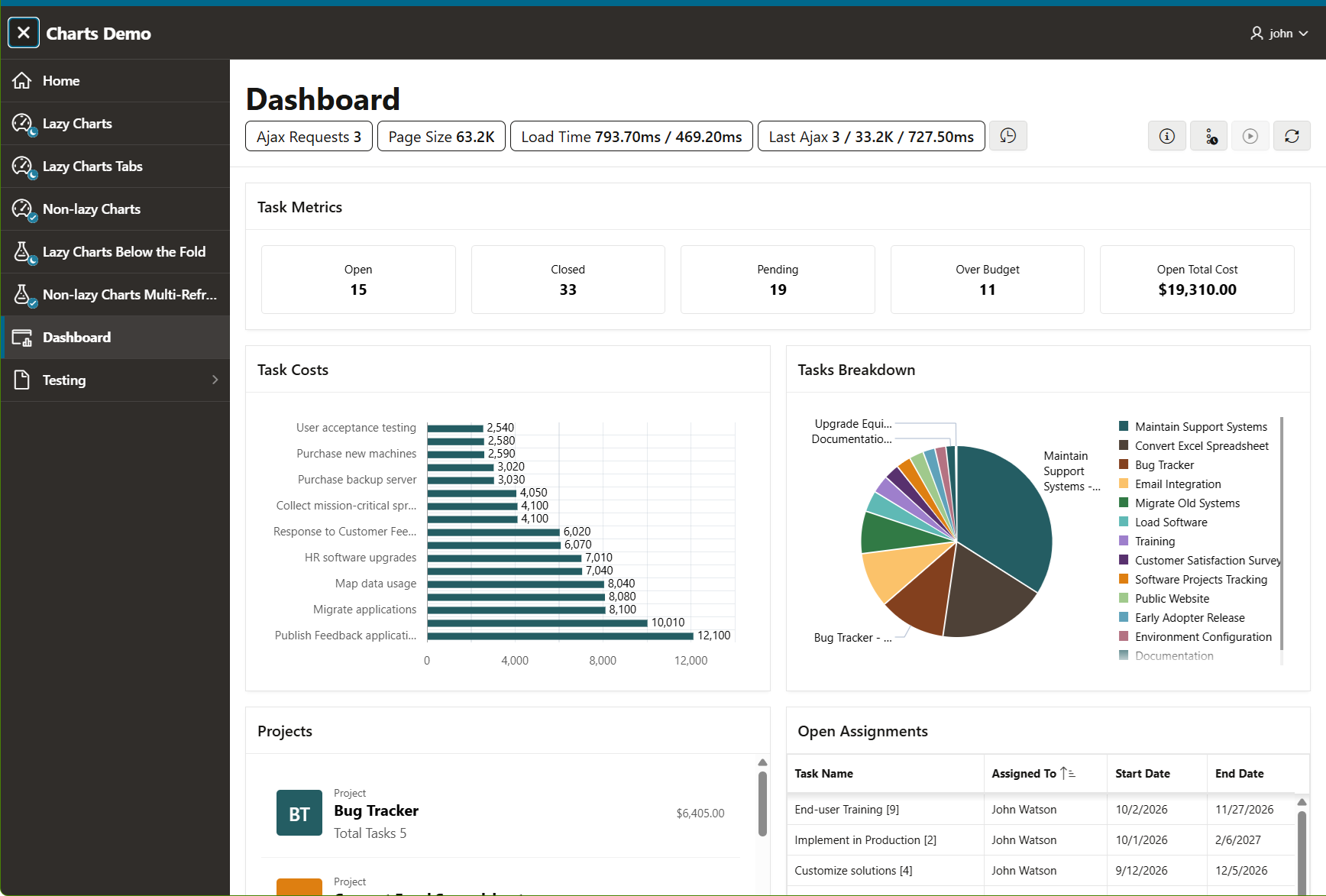
The second is a 26.2 app showing the Charts lazy loading attribute and the performance and network utilization efficiencies that come along with that feature.
For the 26.1 release I worked on the clipboard paste to grid feature. While I think this is a great feature there isn’t much to write about. I presented this in the 26.1 Office hours part 5 and Monica has a great post about it (includes link to office hours video).
A minor thing I worked on is menu button enhancements to support the new builder side icon navigation. Two things were needed. 1) When a menu button is on the side of the screen the menu needs to be positioned on the opposite side not below (or above) the button. 2) Hover button behavior was needed so that a button could have both a normal click behavior and a hover behavior that would open a menu (not as simple as it sounds). Both of these are handled with HTML attributes on a menuButton and documented here.
The side icon navigation was a big change in the builder and we got feedback. Some people hate it and some love it. Personally, I’m not a fan of hover menus and especially when they serve as both a button and a hover menu. But side navigation like this does seem to be popular lately. Material design has something called a “Navigation rail” that is similar and you can see similar UI in popular apps like Slack, although there is a great deal of variation in the details. I fear that the lack of standardization will trip up users as they move from one app to another. There is something positive to be said for the standard menu bars and popup menus in use ever since at least OS2. With the APEX menu widget I tried to stay as close as possible to standard menu behavior. I have written about menus a number of times here, here, here, and here and about navigation in general in this series. No surprise I’m writing about menus again.
Some people have asked if universal theme apps can have a side icon navigation like the builder. There is nothing built-in to UT at this time but the new menu button functionality is documented so it isn’t too hard to create your own. I did just that as a proof of concept. I wanted to go further than what builder does so I created a navigation list template that works with a single list and supports keyboard navigation, responsive menu overflow, expand/collapse state, and optional badges.
Download the New Side Nav app and give it a try. Make sure you have sample data EMP and DEPT tables installed and before you can log into the app you need to setup access control. Go to Shared Components > Application Access Control and click the Add User Role Assignments and make the user an administrator. The reason for this is that I wanted an app with a number of pages and an easy way to do that is to use the create app wizard and enable all the features.
Again this is a proof of concept. You will need to verify and adjust until it is acceptable to you. To put it in your own app take the static application files: newSideNav.js and newNavStyles.css and the list template “Side Navigation Icons”. The only part that relies on undocumented stuff is the integration with the UT expand/collapse behavior using the Main Navigation toggle button in the header. It uses the undocumented js-navExpanded and js-navCollapsed CSS classes and session storage. To avoid this you could create your own page template and that would also allow you to remove the header if you wanted.
For the 26.2 release I worked on the chart lazy loading feature. I presented this feature in the 8-Oct what’s new part 1 APEX Office Hours.
Here is the Charts Demo app from that presentation for you to download. It requires that you first install the Sample Charts app because it uses the same tables (find it in the Gallery). There isn’t much more to say about this app. Each of the main pages has an info (i) icon button that will explain the page. You can also watch the office hours video.
I’ll explain a few things about the new 26.2 JavaScript APIs.
APEX already had a way to fetch data for multiple regions but it is complicated to use and works at the model level so it is only for regions using apex.model. I wrote about it and provided a sample app. The new multipleRefresh region method is much easier to use and can support more kinds of regions. The requirements are that the region uses the apex.server.plugin function with the regions array and the return data is in JSON format and also uses the regions array. As part of the lazy loading feature I changed the Chart region to use the regions array format over the wire.
You may be wondering if you can get your region plug-ins to participate in this multipleRefresh. Currently the answer is that is not supported because we don’t document the one region method you would have to add to your plug-in region interface. If you look at the source for region.js and the region implementation of any of the regions that support coalescing refresh requests you will see how to implement the region addToRefreshRequest method. Again this is not documented and could change in the future. Let us know if participating in coalescing refresh is important for your plug-ins.
Like just about all regions the Chart region had a region interface but it wasn’t documented because it only did what the base region documents. Now chartRegion is documented including the new methods isReady, whenReady, refreshView, startAutoRefresh, and stopAutoRefresh and the new properties autoRefreshInterval, lazyLoading, lazyWhenIrrelevant, and manualLoading.
Most of the methods and properties are clearly related to the new functionality demonstrated by the Charts Demo app. The refreshView method is just a convenience and is consistent with facetsRegion and cardsRegion.
The reason for isReady and whenReady is that APEX charts use Oracle JET and JET takes an extra moment to load because it uses requrejs. Previously the chart region didn’t get created until after JET loaded. So if you tried to use it as soon as the page loads you might get an exception. For example the Sample Charts app has a button with a dynamic action that does this:
apex.region("area1").widget().ojChart({stack: 'off'});
If the user is quick enough they can click the button before JET loads and nothing will happen but they will get an exception in the browser console. This is because before the chart region is created apex.region will return a generic region that doesn’t have a widget so the method returns null.
Now in 26.2 the chart region is created as soon as the page is ready even before JET loads. The isReady and whenReady methods let you check if the region is ready or wait for it to be ready. You can even set JET options before JET is loaded. I highly recommend that you use the call method rather than widget. The above example should be written as:
apex.region("area1").call("option", "stack", "off");
The Chart region and by extension the chartRegion interface is just a wrapper around Oracle JET data visualization components. The chartRegion provides access to the JET API but makes no promise about it. The JET API may change over time and this could break your custom JavaScript code. From the APEX perspective JET is a 3rd party library even if it comes from the same company. Be sure to check the JET release notes for the version that ships with APEX.
For example, lets say that a hypothetical future version of JET decided to change the values of the stack option from “off”, “on” to “YES”, “NO”. APEX would update its code so that the declarative Stack option would still work but if you used the JET API as shown above your app would no longer function correctly until you made the corresponding change.
An app should make the minimum amount of ajax requests needed. For example I often see people using a DA execute server side code action just to do some simple math or string manipulation. This is an unneeded ajax request. Don’t have the server do something that the client can just as easily do even if you know PL/SQL better than you know JavaScript. In general, don’t make an ajax request right after the page loads or just before page submit. That said, sometimes it is necessary to periodically call the server. One use case is to refresh a region so it shows the latest information. Another is to poll the server to find out if a long running process is complete. A naive solution is to use the setInterval function and make the ajax call from the callback. A more flexible and robust solution uses setTimeout. However both of these have a drawback that they keep running even if the user isn’t paying attention. There is no API that tracks where the users eyes are looking but the browser does have a page lifecycle API that can tell us if the page is hidden or active or passive. I consider the active and passive states together to mean the page is in the “foreground”. When the page is hidden, for example the user has activated a different browser tab or another OS window is covering the browser window, there is no point in bothering the server with ajax requests because no user will see the result.
If you have this situation you should use the new ForgroundTimer class. It will pause and not call the interval callback when the page is hidden. No matter how the foreground timer is started, paused, restarted, or stopped it will not call the interval callback in less than the configured interval seconds. Not only does this reduce the network, server, and database load, on a mobile device it can conserve battery power as well.
That’s all. I hope you fined these sample apps helpful.